Friday, March 24, 2017

How To Make Money From Google AdSense: Newbie Guide

Make Money From Google AdSense
Are you looking to earn passive income online? Do you want to work part-time online & pay your mobile & other utility bills? If your answer is yes, this will change your life from here!
Working online has become a lifestyle lately & like you, millions desire to do the same. The interesting fact is; countless users are making a living out of income online. If you have tried researching on how people are making money online, I’m sure you must have read about AdSense few times by now. If not…
This is a complete guide for a newbie like you who wants to work part-time & start earning money via AdSense. By the end of this epic guide, you will have all the required information along with things you need to do to start earning as soon as possible. So let’s skip the basic intro part & learn how people are making money from AdSense by working online & how you can too.

What is Google AdSense & how it can make money for you?

Google AdSense is a free service offered by Google for publishers to monetize their web content. A publisher can be anyone with a blog, Website, Youtube channel or other allowed online property. AdSense has always been most popular ways to monetize the content & stepping stone for people who want to earn online.
The reason for AdSense popularity is because of ease of using it & after initial configuration, all you need to do is sit back & see money coming into your account.  Moreover, they pay in time & you don’t have to worry about being scammed online.
Getting started with AdSense is easy & you need a blog or Youtube channel to get approval for AdSense account. Once you have an account, all you need to do is create ads (Easy process) & place the AdSense code on your blog using free plugins, & AdSense will automatically display ads. Now, When a reader clicks on those ads, you will earn money from it.  After this, your goal is to get traffic to your blog & more traffic you get, more income you will generate.
A word of warning:
If you are thinking this is so easy & you can ask your friends or family to click on the ads, kindly don’t. Google AdSense is a quality ad network that is free to join but they have maintained a high level of quality & any such activities where a publisher is asking to click on ads or using illegal methods to get more clicks,will cost you a disabled AdSense account. Once your account is disabled, it would be hard for you to get back an account.
How much can you earn from AdSense & Income proof:
This is the most basic newbies often ask & you can read this guide to understand how much you can earn. There are users who are making thousands of dollars every day with AdSense. Since I can offer only my proof, here is current screenshot of my AdSense earning in the last six years: $41,854 ( INR 27.5 Lakh)
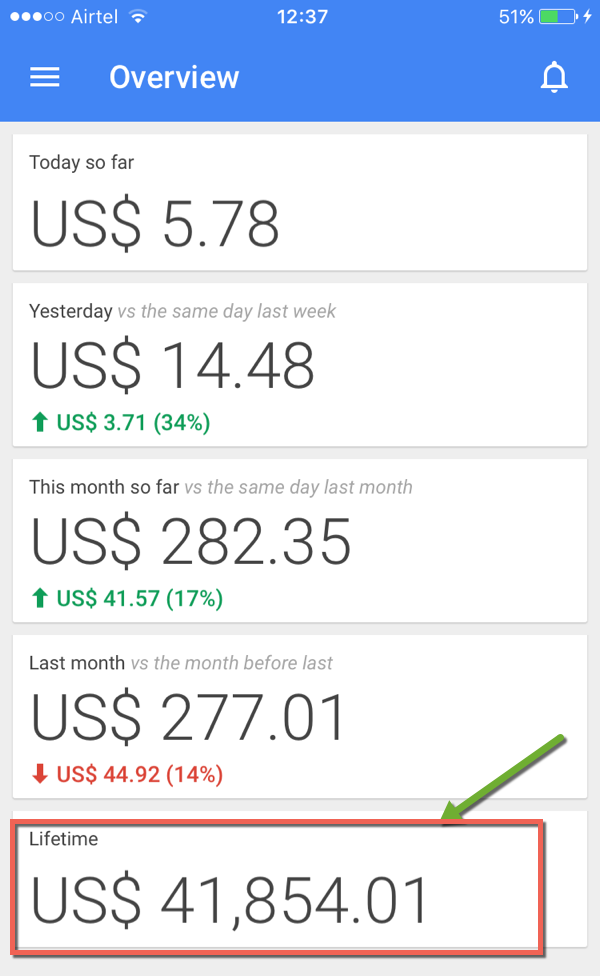
Adsense income proof
I have given links to the best AdSense resources below which would help in setting & maintaining your AdSense account, but first let’s help you in getting a web property that is a requisite before you apply for AdSense account.

Creating your web property for getting an AdSense account:

To apply for an AdSense account, you need to have a web-property. That could be a  blog, website or anything that is allowed by Google. Here I’m listing down three places where you can create a web property in next few minutes to get started. Depending upon your level of understanding, you can start for free or put a little money if you already aware of how things work online.
Create a free blog on BlogSpot:
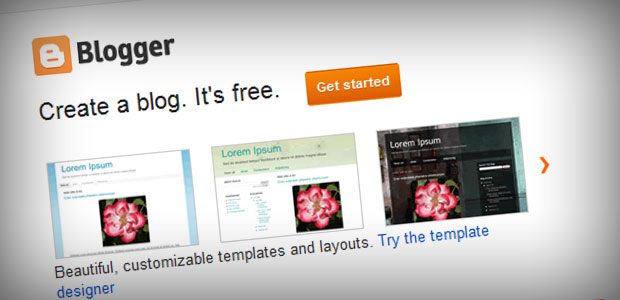
Create free Blog on BlogSpot
BlogSpot is a free blogging platform by Google & you can create a blog of your own in next few minutes (About 10 minutes). This is the best way for anyone who have never worked online & first time trying to make money. Few important things to keep in mind:
  • Domain name: BlogSpot offers a domain name such as selectedname.blogspot.com. It’s advisable to use a name that is easy to remember, type & pronounce. Read: How to decide name of your blog.
  • Niche: Start posting articles in one particular topic. Be it finance, technology, fashion food or anything. Ensure every post you write should have more than 400+ words with images. Writing an article on BlogSpot or all other modern platform is quite easy. Here is how you select the niche of your blog.
  • Design: When you are setting up your first blog on BlogSpot, you will be using any of the template offered by them. They are good, but you can always use a 3rd party free template to make your BlogSpot blog look more professional. Here is a resource for premium looking free BlogSpot template that you can use on your blog.
  • Pages: Posts are for writing articles & pages are for important pages like about, contact & so on. Ensure you create & add About/Contact page from day one. Your about page will have a great impact on your blog visibility & here you can learn why it’s so crucial to have an about page.
Here is a guide to help you create a free blog on BlogSpot. There is also a video embedded in the post which would make the learning easy for you.
Or create a WordPress Blog (Smart & professional way)
This one I recommend to those who have a prior experience of working online or have an idea of how things work. More than 22% of the websites in the world is powered by WordPress & is seen as most respected blogging platform of all time.
The idea of having your hosting & domain name is exciting & seems challenging at first, but WordPress makes it easier for anyone with no experience to gets started with their blog online. Read: How to buy domain & hosting for WordPress blog.
WordPress-eBook
You should download this free eBook on WordPress setup to learn everything about creating a blog on WordPress. For additional questions, feel free to ask me in the comment section. If you are in no mood to read eBook, here are resources that you can refer to right now & create a WordPress blog of your own.
Create a Youtube channel & upload original videos:

YouTube AdSense earning
This is another popular method that is used to get an approved AdSense account. Everybody is not keen of writing & many users love to create & record videos. If you are one of those, you should use this method to make money from AdSense.
You need to create an account on Youtube, create a channel (It’s free) & start uploading original videos that you have created. You can use your mobile phone to record some original watchable videos, or you can use video recording & editing tool like Camtasia to create screencast videos.

What is screencast videos
To give you an idea of what others are doing, HouseWives are creating cooking-related videos, girls are creating fashion related videos, geeks are creating gadgets videos & so on. The possibilities are endless & there is space for everyone. You should check out this & this article to master the basics of Youtube blogging.
Once your Youtube channel is up for few days with constantly video upload (5-10 quality videos), you are most likely to be eligible for making money from uploaded videos. You can head over to this link & apply for monetization. Here you can find more information on Youtube AdSense monetization.
Web property checked- What Next?
Once you have followed any of the above methods to create a web property for yourself. It’s time to apply for AdSense account.  The hard part is to get an approved account & this could be done only if you are committed & working on your web property seriously. Do remember, this is not a get rich quick scheme & requires patience & dedication. The joy part is, you will be paid handsomely for your dedication over the time which is why online money making is so lucrative.
Apply for AdSense:
The next step is to fill out the AdSense application & wait for approval. Here are guides/tutorials (Open them one by one) which will help you to get AdSense approval.
Usually getting an approved account takes up to 7 days & in between if your application got rejected, don’t be upset & try to find out what is missing on your blog. Google need valuable publishers & it’s hard for first-timer to get things right.

Subscribe on Youtube

 
Do you know, it took me more than three retries to get my AdSense account approved. Here are few resources & case-studies from users who got an approved account.
AdSense approved: What should you do next?
Let me promise you one thing, the day you would see first few dollars in your AdSense dashboard, that feeling will be priceless. Now, since you have tested the joy of making money online, your next focus should be increasing the revenue.
Next step for you is to increase your traffic as more traffic will help you generate more money. Not only that, learn some basic AdSense optimization tips like Ad placement and targeting high CPC Keywords. Once you have done all this (Should take a couple of months), then you can focus on creating niche based AdSense sites. You can get a free blueprint for the same from here.
As Henry Ford said the above lines, you can join the league of extraordinary people who are working part-time & generating income online. Or you can be like many, who would wait for some day for the magic to happen. Since you read until here & serious about making a passive income, I have only one thing to tell you:
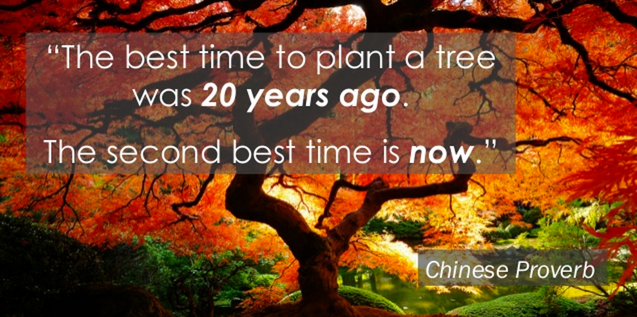
Best time to start adsense
Feel free to ask any questions regarding starting your first blog for AdSense. If you are stuck anywhere, you can always ask questions in ShoutMeLoud Bloggers forum, where many readers like you hang out to help each other.
If you find this guide useful, do share it on Facebook & Twitter. What should be the next article in this series? Let me know in the comment section below.

How to Earn Money Through Google Adsense

Money for nothing? Well, not quite—but close! Google’s AdSense is a revenue-sharing opportunity for small, medium and large web sites that places ads for goods and services that are relevant to the content of your site, targeted to the people who frequent your pages. In turn, you get paid a small amount when the ad is either displayed on your page, or clicked on. We'll show you some good ideas that added to your own, will help increase your AdSense revenue.

1
Creating an Ad Unit

  1. Image titled Earn Money Through Google Adsense Step 1
    1
    Sign into your AdSense account. Go to AdSense, and click on My ads in the upper left.
    • Create a new Ad unit. In the main screen area, under Content > Ad units, click the +New ad unit button.
  2. Image titled Earn Money Through Google Adsense Step 2
    2
    Name your ad unit. This can be any name that suits you, but many find creating a standard naming format helps them manage large amounts of data.
    • For example, using [target site for the ad]_[ad size]_[ad date] is one approach, that would look like this: mywebsite.com_336x280_080112. Whatever format you decide to use for naming, make that your standard.
  3. Image titled Earn Money Through Google Adsense Step 3
    3
    Pick a size. See "How to Do It" below for details, but Google has found best practicesthat generate more clicks.
  4. Image titled Earn Money Through Google Adsense Step 4
    4
    Set your ad type. This determines the types of ads you will see on your website: text only; text and image/rich media; and image/rich media only.
  5. Image titled Earn Money Through Google Adsense Step 5
    5
    Create a custom channel. A custom channel lets you group ad units however you choose, such as by size or location on a page.
    • You can track performance by custom channel, and turn your channel into a targetable ad placement so advertisers can target their ads to your ad units.
  6. Image titled Earn Money Through Google Adsense Step 6
    6
    Create your ad style. This lets you choose colors for the various components of an ad: border, title, background, text, and URL. It also lets you choose corner styles, from square to very rounded, a font family, and a default font size.
    • It's good practice to create an ad style that harmonizes with the look and colors of your website.
    • You can use Google's presets, or use your own custom settings. In either case, a sample ad on the right will show you how your ad will appear
  7. Image titled Earn Money Through Google Adsense Step 7
    7
    Get the code for the ad. When you're done with the ad setup, either save your ad unit, or click the Save and get code button at the bottom to get the HTML code for your site.
    • If adding code to your site is a puzzle you want help with, click here for Google's code implementation guide.

2
How to Design Your Ad Campaign

  1. Image titled Earn Money Through Google Adsense Step 8
    1
    Analyze your content. In designing any kind of ad campaign, it's crucial to know who your target is. If you're writing a food blog that caters to single men on a budget, for example, you've narrowed the scope of who you will be appealing to. You've also got a very good focus point for your ads. What are things single men who cook drawn to? Here are some possibilities: dating, cars, movies, politics, and live music.
    • Think about who frequents your website, write down what you feel are the most important characteristics of your viewers.
  2. Image titled Earn Money Through Google Adsense Step 9
    2
    Fine tune advertisements. While AdSense will auto-populate your page with what they feel are relevant ads, use their tools to provide tighter controls.
    • Set up channels. Channels are like labels that let you group your ad units your way—by color, category, or pages. By setting up channels, you can get detailed reports on the performance of your ad units, and use that to your advantage. For example:
      • Use one style of ad on one group of pages, and another style on another group. Track and compare the performance of the two styles, and pick the best performer.
      • Compare performance on pages that focus on different things. For example, if your pages about gardening perform better than your pages on cooking, you might consider adding more to your gardening pages.
      • If you have separate domains, set up a channel to track each of them to see which is generating the most clicks.
  3. Image titled Earn Money Through Google Adsense Step 10
    3
    Optimize your ad placement and site design. Google has found there are places where ads are more effective, and places where they are less effective.
    • Ads that appear when you first arrive at your page (i.e., "above the fold" as they say in the newspaper world) tend to be more effective than those that are below the fold.
    • Ads on upper left tend to perform much better than ads on the lower right.
    • Ads directly above the primary content, and ads that appear at the bottom of the page and above the footer tend to perform very well.
    • Wider ads are generally more successful, as they are much easier to read.
    • Ads that display images or video perform very well.
    • Using colors that complement your website colors will make them more readable, and so more effective.
  4. Image titled Earn Money Through Google Adsense Step 11
    4
    Learn how AdSense works. AdSense automatically sends ads to your site based on a few different criteria:
    • Contextual targeting. AdSense crawlers scan your page, analyze your content, and serve up ads designed match your content. They do this using keyword analysis, word frequency, font size, and the link structure of the web.
    • Placement targeting. This allows advertisers to choose to run their ads on specific subsections of a publisher's website. If your website matches an advertisers criteria, their ad will appear on your page.
    • Interest-based advertising. This lets advertisers reach users based on their interests and the user's previous interactions with them, such as a visit to their website. Google's Ads Preferences Manager allows users themselves to choose their interest categories, which further helps advertisers focus their ad campaigns. This method is good for monetizing your site more efficiently, as it increases the value for advertisers and provides a more relevant experience for users.

3
What's it Worth?

  1. Image titled Earn Money Through Google Adsense Step 12
    1
    Manage your expectations. When you sign up for AdSense, you'll want to know what kind of revenue can you expect to see. There is a lot that goes into what kind of return you can expect, and managing those things will help you maximize your earning potential.
  2. Image titled Earn Money Through Google Adsense Step 13
    2
    Traffic. First and foremost , in order to generate any kind of revenue from AdSense you must have people clicking on your ads. In order for this to happen, you need to have people on your site, reading your content! Whether you have a business website, or a personal blog, the rule is the same: Get the word out!
    • Heavily trafficked large sites can see over a million hits a day, whereas a blog might feel lucky if they have 100 visitors a day.
    • For every thousand page impressions (views) you receive, you may earn from $.05 to $5. Yes, that's a broad range—over a month, that is between $1.50 and $150.00! Where in that range you can expect to frequent depends entirely on you, your site, and your promotion efforts.
  3. Image titled Earn Money Through Google Adsense Step 14
    3
    Cost Per Click (CPC). This paid every time somebody clicks an ad on your page. No, you can't click your own ad—Google will see this, and shut you down so fast your head will spin. The advertisers set the price for these ads, and they can vary greatly.
    • An advertiser may spend a lot on a per-click basis, but that ad may generate very little interest on your site.
    • An ad that may generate $.03 per click may get 100 hits, but that doesn't add up to much.
  4. Image titled Earn Money Through Google Adsense Step 15
    4
    Click-through Rate (CTR). This is the percentage of visitors to your site compared to how many them actually clicked on an ad. If 100 people came to your site, and 1 of them clicked an ad, your CTR is 1%, and that's not an unreasonable number. You can see how getting more traffic to your site will really make a difference.
  5. Image titled Earn Money Through Google Adsense Step 16
    5
    Revenue per 1000 impressions (RPM). This is an estimate of how much you might receive if you have 1000 impressions (page views).
    • If you made, for example, $1 for 100 impressions, your RPM would be $10. There is no guarantee you'll make that, but it's a good way to check the overall performance of your site.
  6. Image titled Earn Money Through Google Adsense Step 17
    6
    Content is king. The quality of your content is an important factor in understanding your earning potential. If your site provides rich, compelling content and a great user experience, you will have more interested users. Google's crawlers will also have an easier time determining the type of ad content would best fit on your site. Interested users + targeted ads = $$$
  7. Image titled Earn Money Through Google Adsense Step 18
    7
    Start building keyword-rich pages. Liberally seed with well researched, profitable keywords, and get lots of high quality links to your site.
    • If your site is about topics such as debt consolidation, web hosting or asbestos-related cancer, you’ll earn much more per click than if it’s about free puppies.
    • If you concentrate only on top-paying keywords, you’ll face stiff competition. What you want are keywords that are high in demand and low in supply, so do some careful keyword research before you build your pages.

Community Q&A

Unanswered Questions
Show more unanswered questions
Ask a Question

Tips

  • Although Google doesn't release exact details as to how they determine the ads to serve on a given page, they do say that it's the text content of the page that matters, not the meta tags.
  • Avoid non-English characters on English pages. There is a bug which can cause these pages to show irrelevant French ads.
  • Quality is the most important part of any web site. If your site does not contain the content of expected quality the visitor might not come back,
  • Some webmasters are designing brand new sites specifically for serving AdSense text ads, however it’s against the AdSense rules to design a site purely for AdSense, so you’ll want to include a few Affiliate links or sell your own product, too.
  • A great resource for earning money is using traffic driving sites like Flixya You can sign up for Google Adsense and Flixya, without the costs or time needed to build traffic or your own site.

Warnings

  • Do not click your ads. If Google catches you, they will suspend your account and retain any earnings you might have. However, if you, by mistakes, click your ads for one or two times, Google will keep that earning but rather not to punish you as long as it doesn't happen constantly.
  • In early internet days, you may see a site notice asking everyone to click the ads. The day has gone long time ago. If Google detects possible cheating, there is no such thing as presumption of innocence. They assume that you are guilty.
  • Google has a lot of restrictions on how the ads have to be displayed. One of the major reasons for account suspension is that webmasters tried to blur the ads and mislead others to think that it's "content". For simplicity, never attempt to use CSS to hide Google's logo unless you're authorized to do it!
  • If you don't have any content, Google will have to guess what your page is about. It may guess wrong, and so the ads that it displays may not be relevant.

Article Info

Featured Article
In other languages: